drophost
Containerization and DevOps — Assignment 1
| Name | Divyanshu Gaur |
| SAP ID | 500121752 |
| Roll No. | R2142230859 |
| Batch | 1 |
Table of Contents
- Project Overview
- Build Optimization — Multi-Stage Dockerfiles
- Network Design
- Macvlan vs IPvlan — In-Depth Comparison
- Screenshot Proofs
- Docker Compose Configuration
- Conclusion
1. Project Overview
DropHost is a self-hosted static site deployment platform built for LAN-only access. Users upload ZIP files through a REST API; the backend extracts them, generates an Nginx server block, and the site becomes immediately accessible on the local network via a dedicated LAN IP address assigned through Docker Macvlan networking.
1.1 Services at a Glance
| Service | Container Name | Technology | Role |
|---|---|---|---|
| backend | drophost-backend | Node.js 20 + Express | REST API — handles uploads, DB writes, Nginx config generation |
| db | drophost-db | PostgreSQL 16 Alpine | Persistent data store — deployments, config versions, access logs |
| nginx-proxy | drophost-nginx | Nginx Alpine | Reverse proxy — serves dashboard, routes /d/{slot}/ to live sites |
1.2 API Endpoints
| Method | Endpoint | Description |
|---|---|---|
POST |
/deployments |
Upload ZIP → extract → generate Nginx config → insert DB record |
GET |
/deployments |
Fetch all deployment records from PostgreSQL |
GET |
/health |
Healthcheck — returns 200 OK when backend + DB are ready |
1.3 Database Schema
The PostgreSQL database (drophost) is initialized automatically via init.sql on first container start. Three tables are created:
- deployments — stores site name, URL slug, file path, status (
pending/building/live/failed/expired), LAN URL, TTL, and timestamps - config_versions — versioned Nginx server block snapshots linked to each deployment
- access_logs — per-request analytics: client IP, user agent, status code, timestamp
2. Build Optimization — Multi-Stage Dockerfiles
Both the backend and database services use purpose-built Dockerfiles with Alpine base images. The backend applies a strict two-stage build pattern to keep the production image lean and free of build-time artifacts.
2.1 Backend Dockerfile — Stage-by-Stage Analysis
Stage 1 — Builder
FROM node:20-alpine AS builder
WORKDIR /app
COPY package*.json ./
RUN npm ci --omit=dev
Why copy package*.json first?
Docker builds images layer by layer and caches each one. By copying only the manifest files before the source code, the expensive npm ci step is cached independently of application code. If package.json has not changed, Docker reuses the cached dependency layer — subsequent builds complete in seconds instead of minutes.
Why --omit=dev?
This flag instructs npm to skip all devDependencies (test frameworks, linters, type checkers, etc.). These are only needed during development and have no place in a production image — excluding them removes tens of megabytes and reduces the attack surface.
Stage 2 — Runtime
FROM node:20-alpine AS runtime
WORKDIR /app

RUN apk add --no-cache docker-cli curl ca-certificates \
    && update-ca-certificates

RUN mkdir -p /var/sites /etc/nginx/conf.d \
    && chmod -R 777 /var/sites /etc/nginx/conf.d

COPY --from=builder /app/node_modules ./node_modules
COPY src/ ./src/
COPY package.json ./

EXPOSE 8000
HEALTHCHECK --interval=10s --timeout=5s \
  CMD curl -f http://localhost:8000/health || exit 1

CMD ["node", "src/index.js"]
Fresh base, zero build residue.
The runtime stage starts from the same node:20-alpine image but has no knowledge of Stage 1 beyond what is explicitly copied via --from=builder. The npm cache, temporary download files, and the full builder stage are discarded entirely — they never appear in the final image layer history.
HEALTHCHECK instruction.
A built-in Docker healthcheck polls /health every 10 seconds. This integrates directly with the Compose depends_on: condition: service_healthy directive, ensuring the backend is only considered ready after the Express server is accepting connections — not merely after the process starts.
2.2 Database Dockerfile
FROM postgres:16-alpine
COPY init.sql /docker-entrypoint-initdb.d/init.sql
The database image extends the official PostgreSQL 16 Alpine image — one of the smallest available at approximately 85 MB. The only addition is copying init.sql into the standard initialization directory. PostgreSQL’s entrypoint script automatically executes all .sql files in that directory on first startup, bootstrapping the full schema without any additional tooling or migration framework.
2.3 .dockerignore Files
Both the backend and database directories include .dockerignore files. The backend’s file excludes node_modules (the local development copy), .git, and docs. This has two benefits: the Docker build context sent to the daemon is smaller, and there is no risk of accidentally overwriting the clean npm ci installation with a potentially inconsistent local node_modules directory.
2.4 Image Size Comparison
| Service | Base Image | Alpine Size | Standard Debian Equivalent | Saving |
|---|---|---|---|---|
| backend | node:20-alpine | ~180 MB | node:20 (~1.1 GB) | ~920 MB |
| db | postgres:16-alpine | ~85 MB | postgres:16 (~380 MB) | ~295 MB |
| nginx-proxy | nginx:alpine | ~42 MB | nginx:latest (~188 MB) | ~146 MB |
Multi-Stage Build Impact (Backend)
| Stage | Contents | Approx. Size |
|---|---|---|
| Builder (discarded) | node:20-alpine + npm cache + devDependencies + temp files | ~350 MB |
| Final runtime image | node:20-alpine + prod node_modules + src/ + docker-cli + curl | ~260 MB |
| Saving vs single-stage | devDependencies, npm cache, build tooling eliminated | ~90 MB saved |
3. Network Design
3.1 Dual-Network Architecture
DropHost uses two Docker networks with distinct responsibilities:
| Network | Driver | Purpose |
|---|---|---|
| internal_net | bridge | Private service-to-service communication. Backend reaches the database using the hostname db. Nginx proxies API calls to backend:8000. Invisible outside the Docker host. |
| drophost_macvlan | macvlan | Exposes nginx-proxy directly on the LAN with its own MAC address and static IP (10.250.0.12). Any device on the same LAN subnet can reach the dashboard and deployments without port-forwarding. |
3.2 Network Creation Command
docker network create \
  -d macvlan \
  --subnet=10.250.0.0/24 \
  --gateway=10.250.0.1 \
  -o parent=eth0 \
  drophost_macvlan
-d macvlan — selects the Macvlan network driver, which assigns each container its own virtual MAC address on the physical NIC.
--subnet=10.250.0.0/24 — must contain the static IP assigned to nginx-proxy (10.250.0.12). A mismatch causes Docker Compose to refuse to start the container.
-o parent=eth0 — binds the virtual network to the host’s physical Ethernet interface. All Macvlan traffic is injected directly into the LAN at the Ethernet frame level.
3.3 Network Design Diagram
┌─────────────────────────────────────────────────────────────┐
│           LAN Clients  (any device on same LAN)             │
│                         HTTP :80                            │
└─────────────────────────┬───────────────────────────────────┘
                          │
              Macvlan network (drophost_macvlan)
                          │
┌─────────────────────────▼───────────────────────────────────┐
│             nginx-proxy  —  10.250.0.12                     │
│  ├─ /             →  static dashboard (built-in)            │
│  ├─ /api/         →  proxy_pass backend:8000                │
│  └─ /d/{slot}/    →  site_files volume (dynamic conf)       │
└─────────────────────────┬───────────────────────────────────┘
                          │
              internal_net (bridge)
              ┌───────────┴───────────┐
              │                       │
┌─────────────▼───────┐  ┌────────────▼──────────┐
│  drophost-backend   │  │     drophost-db        │
│  Node.js  :8000     │◄─►  PostgreSQL  :5432     │
│                     │  │  └─ postgres_data vol  │
└─────────────────────┘  └───────────────────────┘
        │
   site_files vol  ──────────────────────────────► nginx
   nginx_confd vol ──────────────────────────────► nginx
3.4 Static IP Assignment in Docker Compose
nginx-proxy:
  networks:
    internal_net:
      aliases:
        - nginx-proxy
    drophost_macvlan:
      ipv4_address: 10.250.0.12   # static LAN IP
The nginx-proxy service is attached to both networks simultaneously. On internal_net it is reachable by other containers using the alias nginx-proxy. On drophost_macvlan it appears to the LAN with the static IP 10.250.0.12 and its own MAC address.
3.5 Volume Design
| Volume | Mounted By | Purpose |
|---|---|---|
| postgres_data | db | PostgreSQL data directory — survives container restarts and image upgrades |
| site_files | backend + nginx-proxy | Uploaded site files written by backend (/var/sites), read by Nginx to serve deployments |
| nginx_confd | backend + nginx-proxy | Dynamic Nginx .conf snippets generated per deployment, included via nginx.conf include directive |
4. Macvlan vs IPvlan — In-Depth Comparison
4.1 What Problem Do They Solve?
Standard Docker bridge networking uses NAT: containers get private IPs (172.17.x.x) and the host forwards traffic using iptables rules. This works but means containers are not first-class LAN participants — external devices can only reach them via the host’s IP and a mapped port.
Both Macvlan and IPvlan solve this by allowing containers to appear directly on the physical LAN with their own IP addresses, bypassing NAT entirely. The key difference is how they handle MAC addresses at Layer 2.
4.2 How Macvlan Works
Macvlan creates a virtual network interface for each container and assigns it a unique MAC address derived from the parent NIC. The container’s Ethernet frames are injected directly into the physical network. From the perspective of a LAN switch or router, each Macvlan container looks like a separate physical machine plugged into the network.
- Layer of operation: Layer 2 (Data Link) — operates at the Ethernet frame level
- Each container gets: a unique MAC address + its own IP on the LAN subnet
- Traffic path: container NIC → virtual MAC → parent NIC → physical switch → LAN
- DHCP: full support — each container can request its own IP lease (unique MAC)
4.3 Macvlan Host Isolation Issue
⚠️ Important Limitation — Host Cannot Communicate with Macvlan Containers
By design, a host NIC cannot send traffic to its own Macvlan children. The physical NIC acts as the parent interface but the kernel prevents loopback between the host and its Macvlan sub-interfaces.
Workaround: Create a dedicated Macvlan interface on the host itself in the same subnet, then assign it an IP. This gives the host a separate path to reach the containers.
In the DropHost deployment environment (WSL2 / Hyper-V): Macvlan operates at the network configuration level but full LAN injection is mediated by the hypervisor. The
docker network inspectoutput confirms the network is correctly configured. As demonstrated in Section 5.4,http://10.250.0.12is unreachable from the host browser — this is the expected Macvlan host isolation behaviour on WSL2.
4.4 How IPvlan Works
IPvlan takes a different approach: all containers share the parent NIC’s MAC address. Instead of multiplying MAC addresses, it multiplexes containers at the IP layer. It has two sub-modes:
IPvlan L2 Mode
- Containers share the parent’s MAC address
- Each container still gets its own IP on the LAN subnet
- Traffic is switched at Layer 2 but without unique MACs per container
- Works on switches that restrict multiple MACs per port (unlike Macvlan)
- Same host-isolation issue as Macvlan — workaround required
IPvlan L3 Mode
- Containers are treated as routed endpoints behind the host
- Host acts as an IP router — upstream router must have a static route to the container subnet
- No broadcast or multicast traffic reaches containers
- No host-isolation issue — host can reach containers natively
- Most complex setup; requires router configuration changes
4.5 Side-by-Side Comparison
| Property | Macvlan | IPvlan L2 | IPvlan L3 |
|---|---|---|---|
| Network Layer | L2 (Ethernet) | L2 (Ethernet) | L3 (IP routing) |
| MAC per Container | Unique (virtual MAC) | Shared (parent MAC) | Shared (parent MAC) |
| Container LAN IP | Yes | Yes | Yes (routed) |
| DHCP Support | Full | Limited | Not applicable |
| Broadcast / Multicast | Supported | Supported | Not supported |
| Host ↔ Container | Requires workaround | Requires workaround | Works natively |
| Switch Compatibility | Needs promiscuous / multi-MAC port | Standard switch | Standard switch + router route |
| Router Config Needed | No | No | Yes (static route) |
| Best For | Distinct LAN hosts, DHCP | Shared-MAC LAN access | Routed microservices |
4.6 Why Macvlan Was Chosen for DropHost
- Static, predictable LAN IP (10.250.0.12) — users can bookmark the dashboard address without any router configuration or port-forwarding rules.
- Single entry point model — the nginx-proxy is the only container that needs LAN exposure. A dedicated LAN identity for this service matches the architecture intent.
- DHCP compatibility — the unique MAC address means the Macvlan container could also receive a DHCP-assigned IP if preferred, offering flexibility.
- IPvlan L3 was considered but rejected because it requires adding static routes on the LAN router, introducing setup complexity that defeats the self-hosted simplicity goal of DropHost.
- IPvlan L2 was a viable alternative but offers no advantage over Macvlan for a single-container LAN exposure use case, and Macvlan is better documented for this pattern.
5. Screenshot Proofs
5.1 docker network inspect — drophost_macvlan
docker network inspect drophost_macvlan
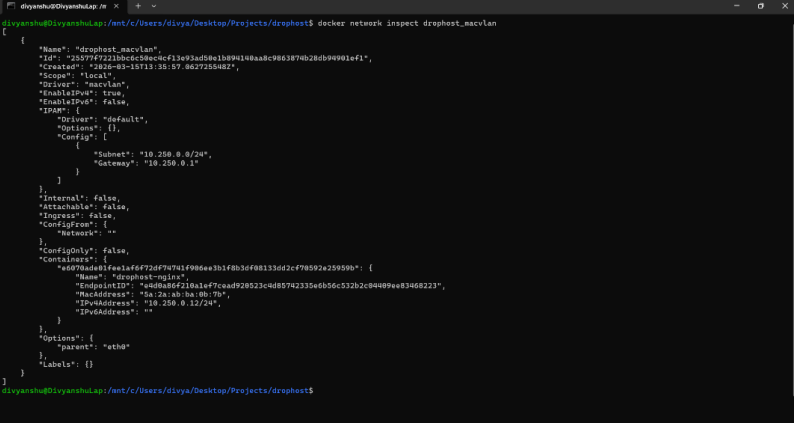
Shows: Macvlan driver · subnet
10.250.0.0/24· gateway10.250.0.1· parenteth0· nginx-proxy container attached at10.250.0.12
5.2 Running Containers and IP Addresses
docker ps
docker inspect drophost-backend | grep IPAddress
docker inspect drophost-db      | grep IPAddress
docker inspect drophost-nginx   | grep IPAddress
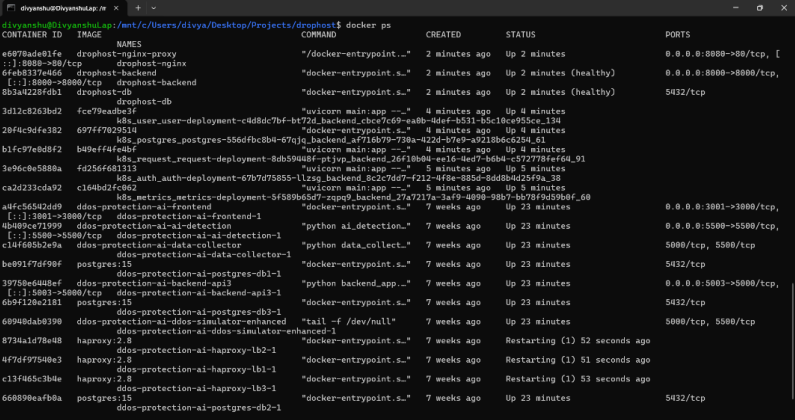
Shows:
drophost-nginx,drophost-backend,drophost-db— all Up and healthy alongside other running containers on the system
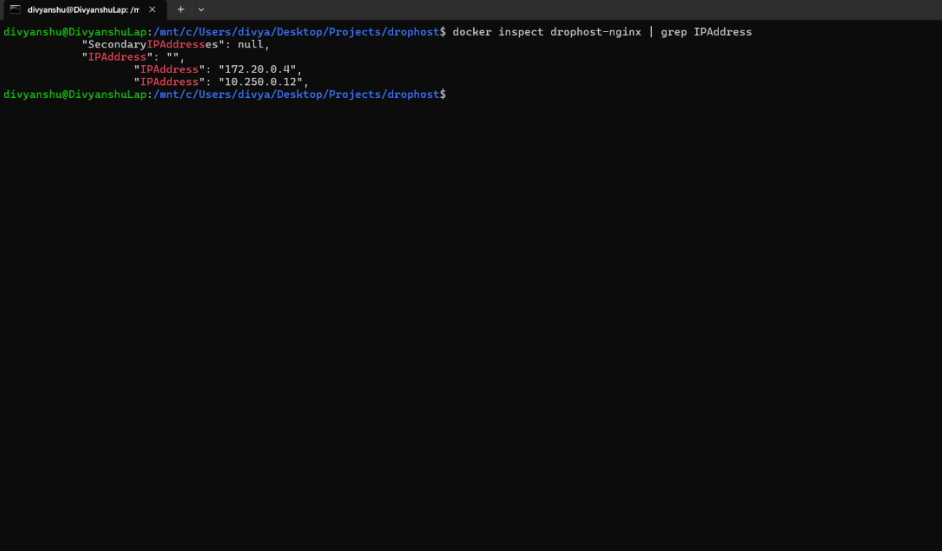
drophost-nginx→172.20.0.4(internal_net) +10.250.0.12(drophost_macvlan) — dual network attachment confirmed
5.3 Volume Persistence Test
# Step 1 — Insert a test record
docker exec -it drophost-db psql -U drophost_user -d drophost -c \
  "INSERT INTO deployments (name, slot, file_path, status) \
   VALUES ('test-site', 'abc123', '/var/sites/abc123', 'live');"

# Step 2 — Tear down containers (volumes preserved)
docker compose down

# Step 3 — Restart
docker compose up -d

# Step 4 — Verify data survived
docker exec -it drophost-db psql -U drophost_user -d drophost -c \
  "SELECT name, slot, status FROM deployments;"
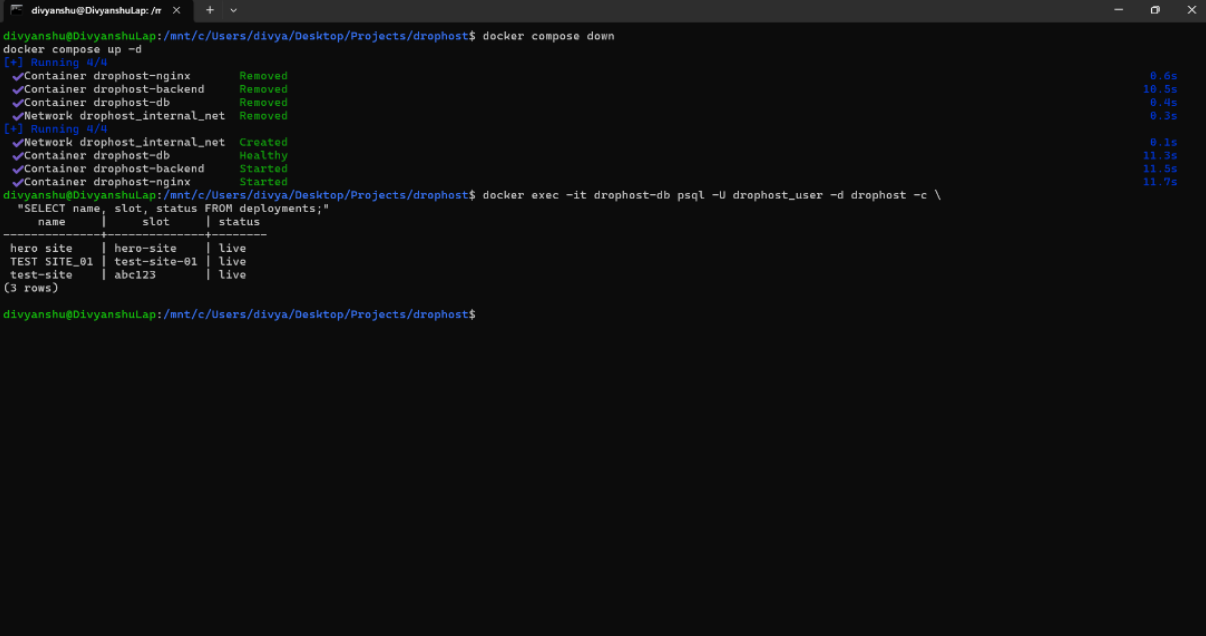
Shows:
docker compose downremoving all containers and networks →docker compose up -drecreating them →SELECTreturning 3 rows (hero site,TEST SITE_01,test-site) all with statuslive— confirmingpostgres_datavolume persistence across full container lifecycle.
5.4 Application Running
Dashboard accessible at http://localhost:8080:
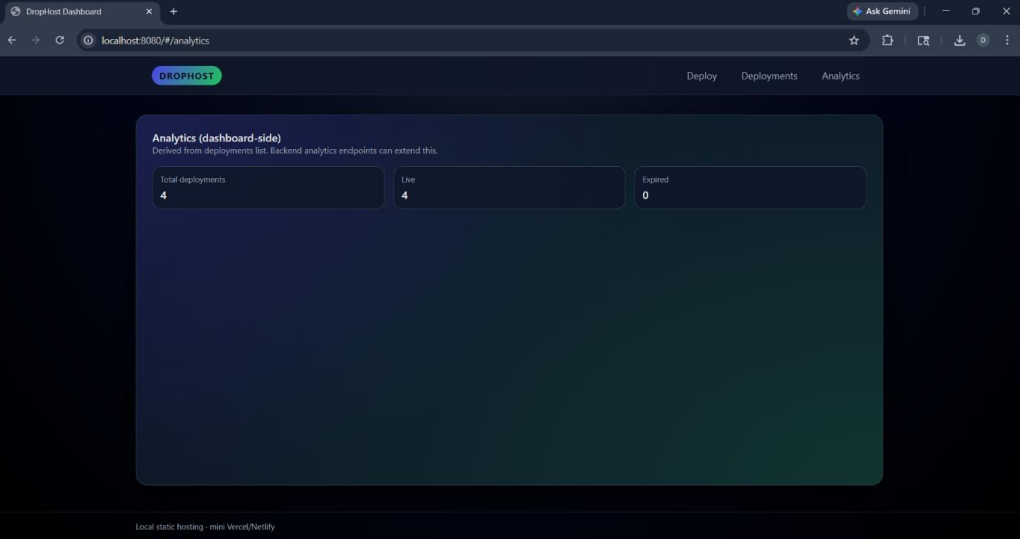
Analytics tab: Total deployments: 4 · Live: 4 · Expired: 0
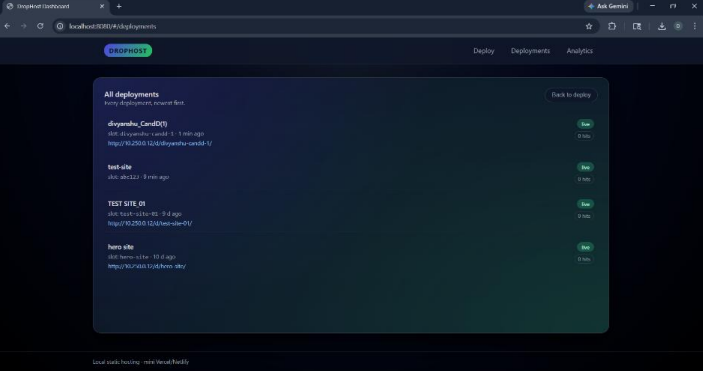
Deployments list —
divyanshu_CandD(1),test-site,TEST SITE_01,hero site— all Live with LAN URLs athttp://10.250.0.12/d/{slot}/
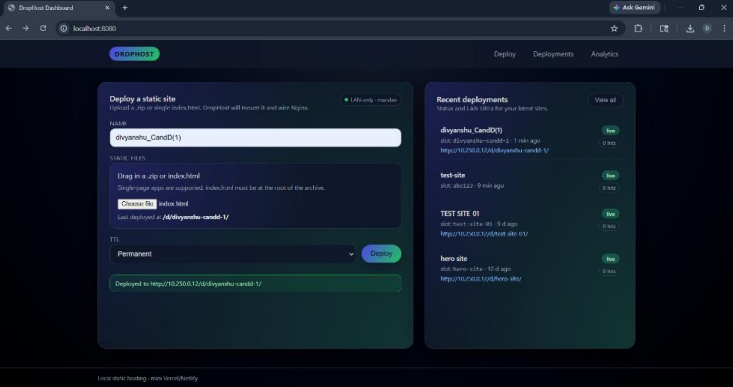
Deploy tab —
divyanshu_CandD(1)successfully deployed tohttp://10.250.0.12/d/divyanshu-candd-1/
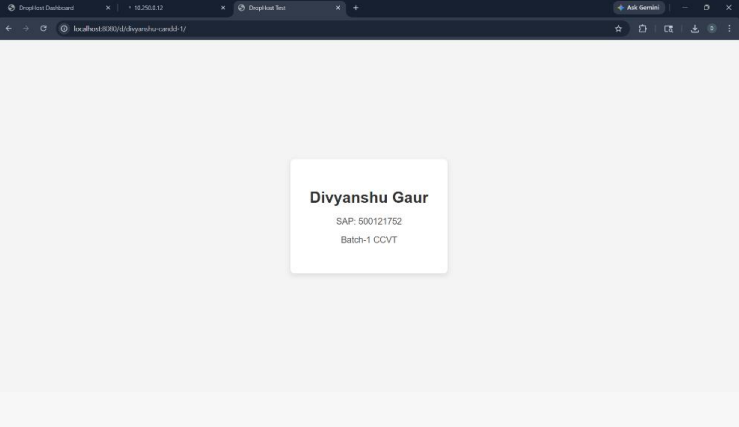
The deployed static site live at
http://localhost:8080/d/divyanshu-candd-1/— showing student card: Divyanshu Gaur · SAP: 500121752 · Batch-1 CCVT
5.5 Macvlan Host Isolation Issue
Dashboard not accessible at http://10.250.0.12 from the host machine:
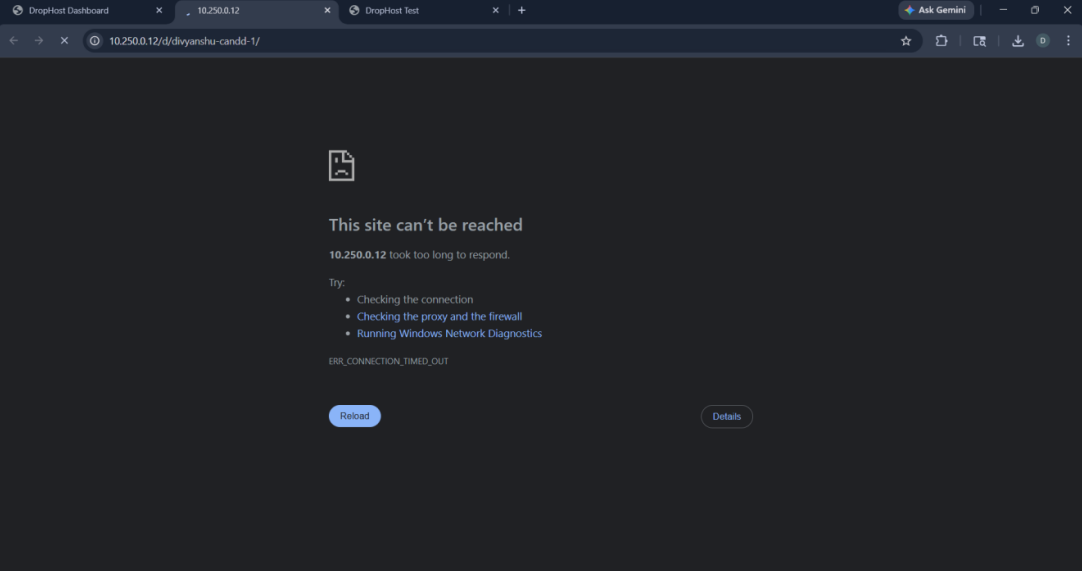
ERR_CONNECTION_TIMED_OUTonhttp://10.250.0.12/d/divyanshu-candd-1/— expected behaviour. The host NIC cannot communicate with its own Macvlan children (kernel-level restriction). The Macvlan IP is reachable from other LAN devices but not from the same host that created the network. On WSL2/Hyper-V this limitation is further compounded by the hypervisor’s virtual NIC layer.
6. Docker Compose Configuration
The docker-compose.yml orchestrates all three services, both networks, and all three named volumes. Key design decisions are explained below.
6.1 Service Startup Order
The depends_on directives enforce a strict, health-checked startup sequence:
db           →  starts first
              healthcheck: pg_isready -U drophost_user -d drophost

backend      →  starts after db is healthy
              healthcheck: curl -f http://localhost:8000/health

nginx-proxy  →  starts after backend is started
This prevents the backend from crashing on startup due to a connection refused error from PostgreSQL, and prevents Nginx from starting before the API it proxies is available.
6.2 Environment Variable Security
All secrets and configuration are passed via an .env file referenced with env_file: .env on each service. The .env file is listed in .gitignore and never committed to the repository. The Compose file itself contains no hardcoded credentials.
6.3 Restart Policy
All services use restart: unless-stopped. This ensures containers automatically recover from crashes or system reboots without requiring manual intervention, matching production expectations.
6.4 Docker Socket Mount
The backend mounts /var/run/docker.sock to allow the Node.js process to spawn child containers for deployments. This is a deliberate design choice for the DropHost use case (dynamic site hosting) and is scoped to the backend service only.
The key architectural insight of this project is the dual-network pattern: an internal bridge network provides secure, isolated service-to-service communication, while Macvlan grants the reverse proxy a genuine LAN identity. This separation of concerns is a reusable pattern applicable to any self-hosted production deployment.
The multi-stage build strategy proved its value concretely: the backend image is approximately 90 MB smaller than an equivalent single-stage build, and all three Alpine-based images combined are still smaller than a single standard Debian Node.js image.